Imagine, you scan a few hundred hosts to create a summary report. You want to show data on ports and operating systems without giving the end user hundreds of pages of data. Enter the “Top 10” script!
Credit for this script idea goes to Chris from I.S. Partners. He reached out via the support inbox to see if we could create a “Top 10” script that would do the following:
Create an array of all of the operating systems, ports/protocols, and services in the project
Deduplicate the arrays and count the number of instances
Narrow down the array to the top 10 based on the number of instances
Update a Content Block in the project with a textile table based on each array
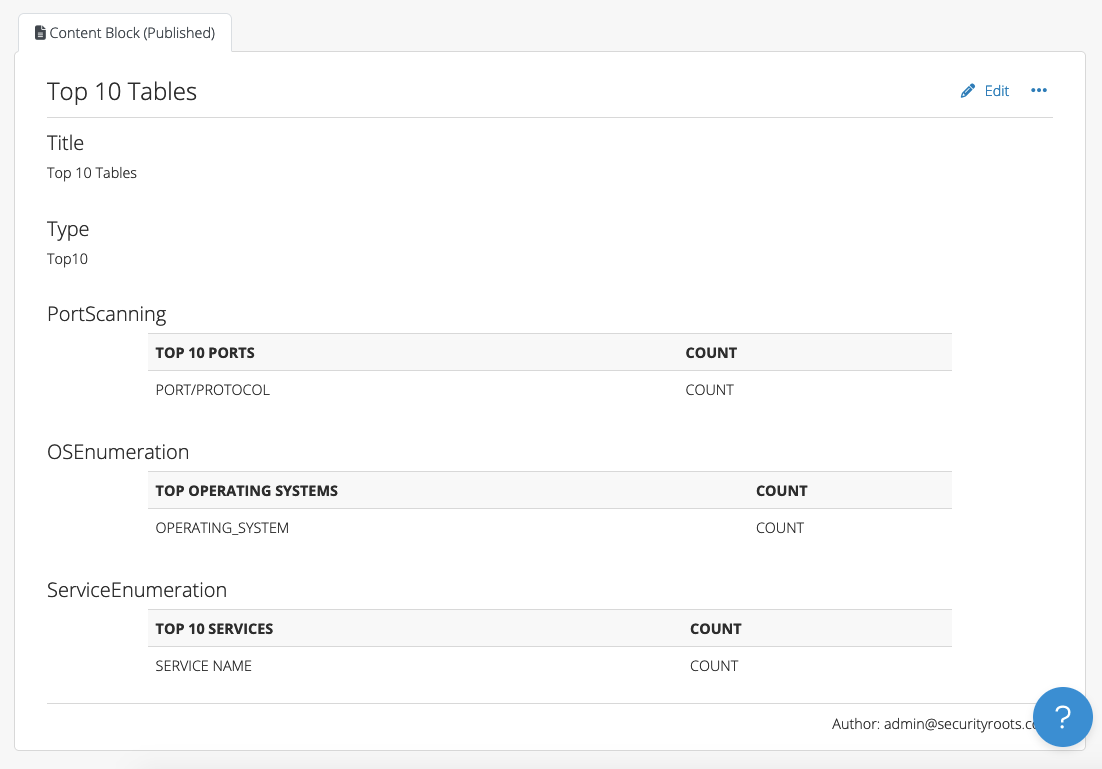
The script assumes that you have a Content Block with the Type field set to “Top10” with the following fields:
PortScanning
OSEnumeration
ServiceEnumeration
Head to our scripting repo and check out the “Top 10” script. To use it:
1. SCP the top10.rb file to your instance (e.g. to the /tmp folder)
2. In the browser, find the project ID of the project that you need to update. For example, if your project lives at /pro/projects/123 in the browser, the ID is 123.
3. Run the following in the command line as “dradispro”: $ cd /opt/dradispro/dradispro/current/ $ RAILS_ENV=production bin/rails runner /tmp/top10.rb <project_id>
You’ll need to sub in your project ID (Step #2 above) for “<project_id>” above! Example:
When the script completes, you’ll see this output in the console:
Port Scanning table updated!
Service Enumeration table updated!
OS Enumeration table updated!
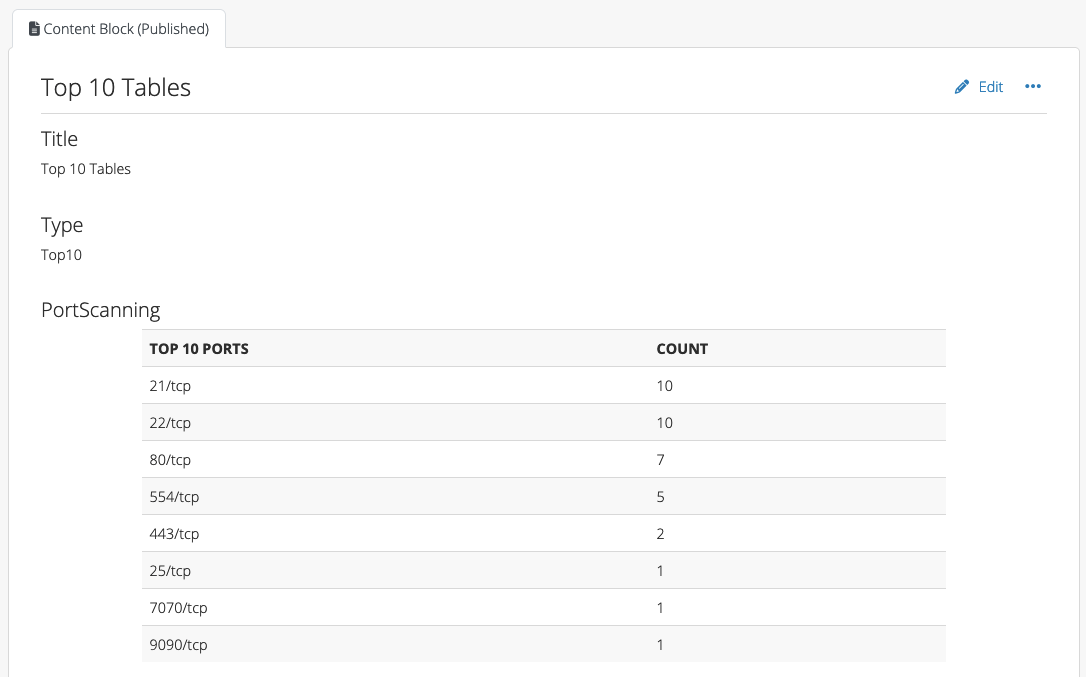
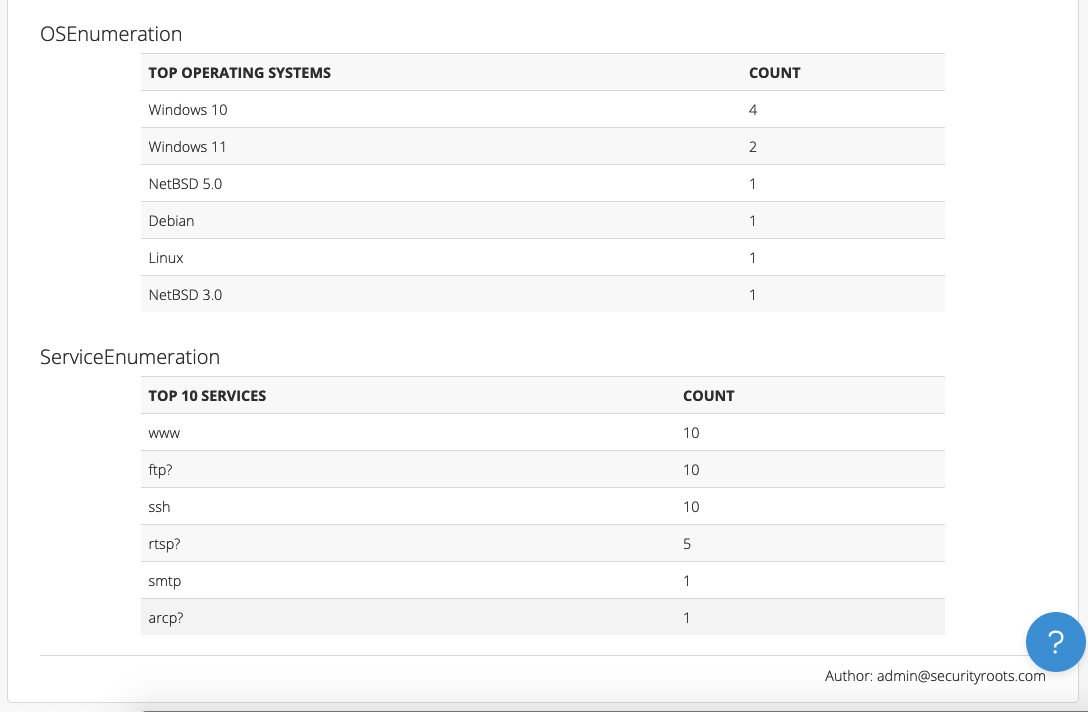
After running the script, you can refresh the Top 10 content block to see the updated tables:
Chris reported that with their largest Nessus file (125MB), the script was able to perform the calculations successfully in less than 30 seconds. We’re optimistic about a similar script’s performance with your projects.
This script will need to be adjusted to meet your individual team’s specific requirements and preferences. But, we think it’s a promising option for teams who prefer not to use VBA or want to create similar tables in their Word reports.
If you need any help customizing this script to meet your specific use case, please reach out to our support team. Or, if you have ideas for improvements, please fork the repo and post in our users forum.
We have already supported Liquid content in Dradis Gateway templates for a while – now we are bringing Liquid Dynamic Content to Word and HTML reports as well.
Want to refer to document properties like dradis.client inside a ContentBlock? Want to show the count of evidence inside the text of an Issue? Want to use conditionals like “If this property is in Spanish, export this issue in Spanish instead of English”? Now you can!
We now have two more filtering options available in Word: Filters with spaces, and filters on Nodes.
Filtering with spaces means you can use double quotes in both field names and filter values. For example, you can filter by “CVSS Base"|(9.0..10.0) or Category|"A1 Injection“.
Nodes can be filtered by Node Properties. For example, if you have a Node property for type with values of internal/external, you can filter a Node by type|internal to only see content for internal-type Nodes.
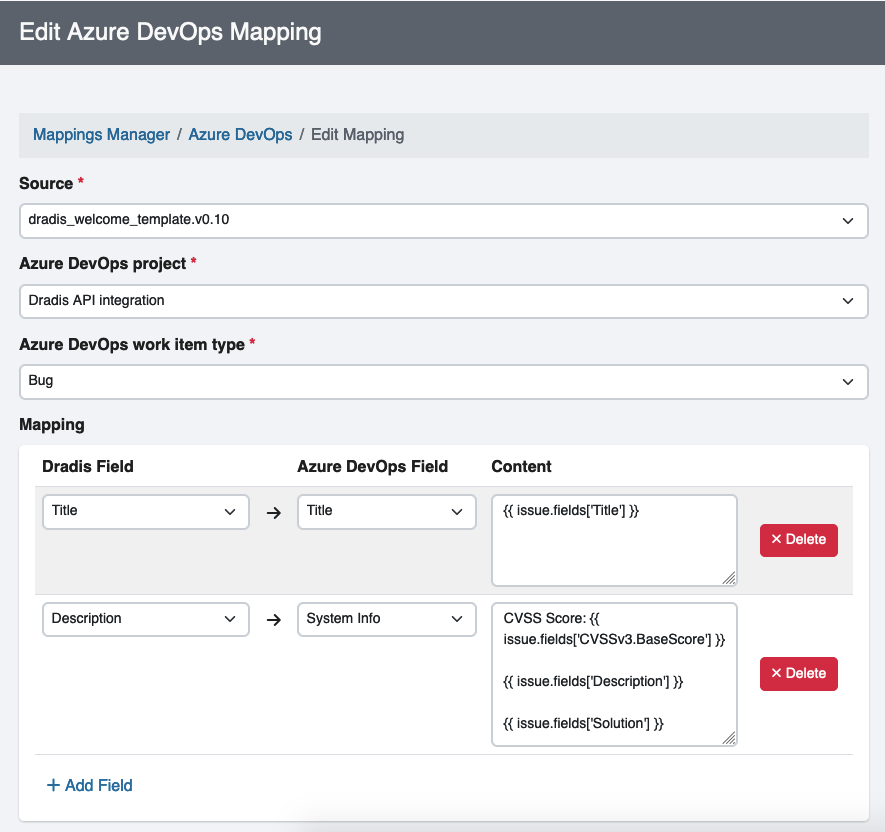
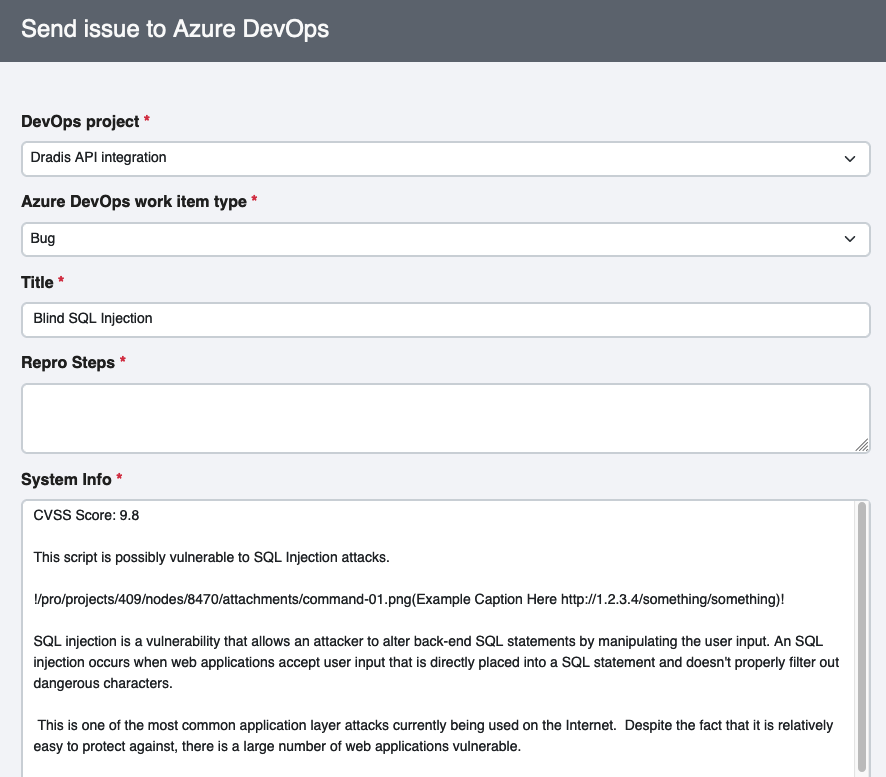
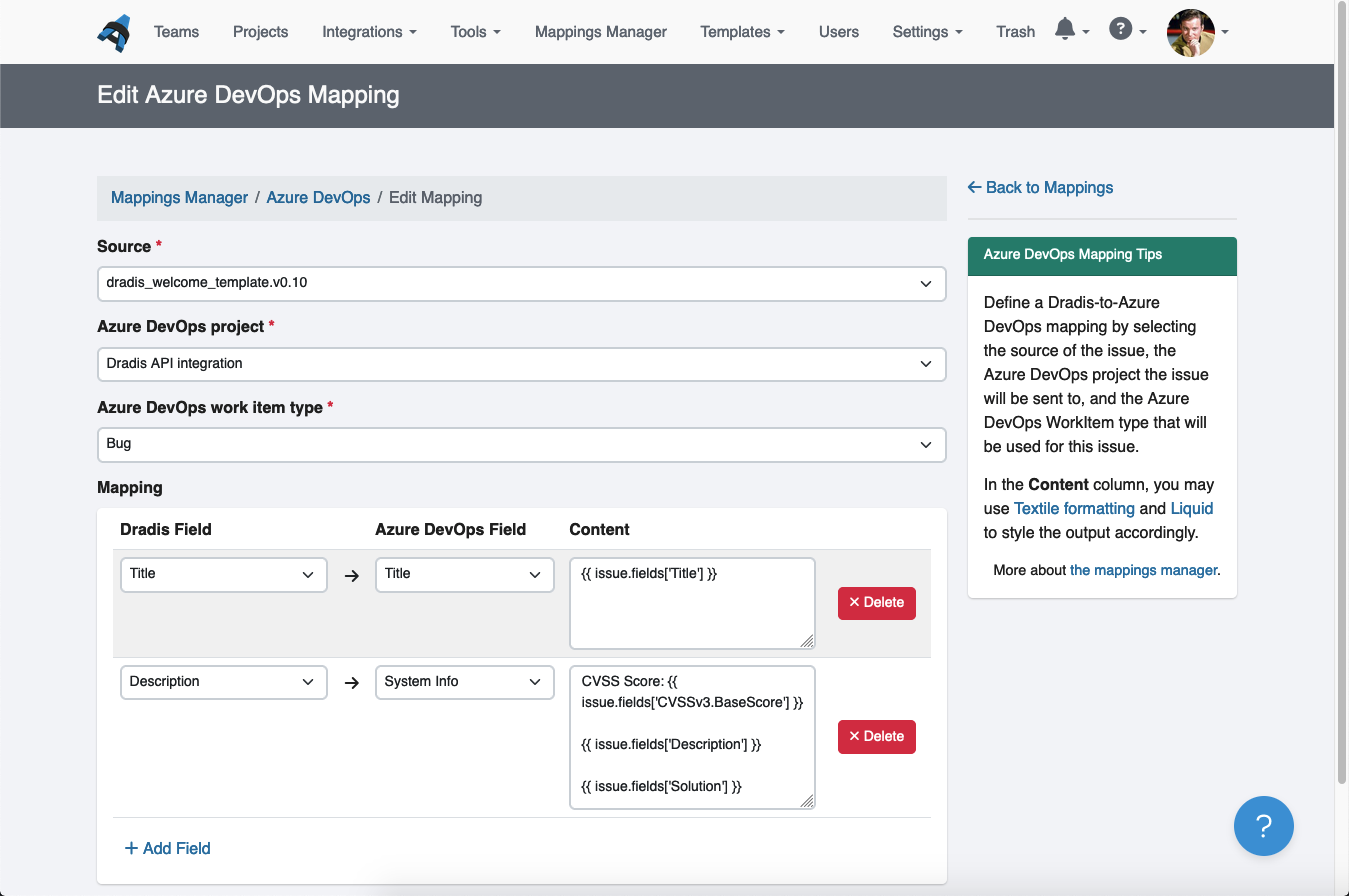
What was previously the Plugin Manager is now the Mappings Manager as we’ve extended the functionality to Azure DevOps and Jira. You told us that you usually have a pattern for the data that you send to these external tools. For example, you’d want a specific set of fields from your Dradis issue to go into your Jira card’s description.
The Mappings Manager allows you to configure that mapping so that the next time you send an Issue to Azure DevOps or Jira, the editor will pre-populate with the data from your Issue in the exact format you specified. You’ll still have the ability to edit it before sending the Issue to Azure DevOps or Jira if needed.
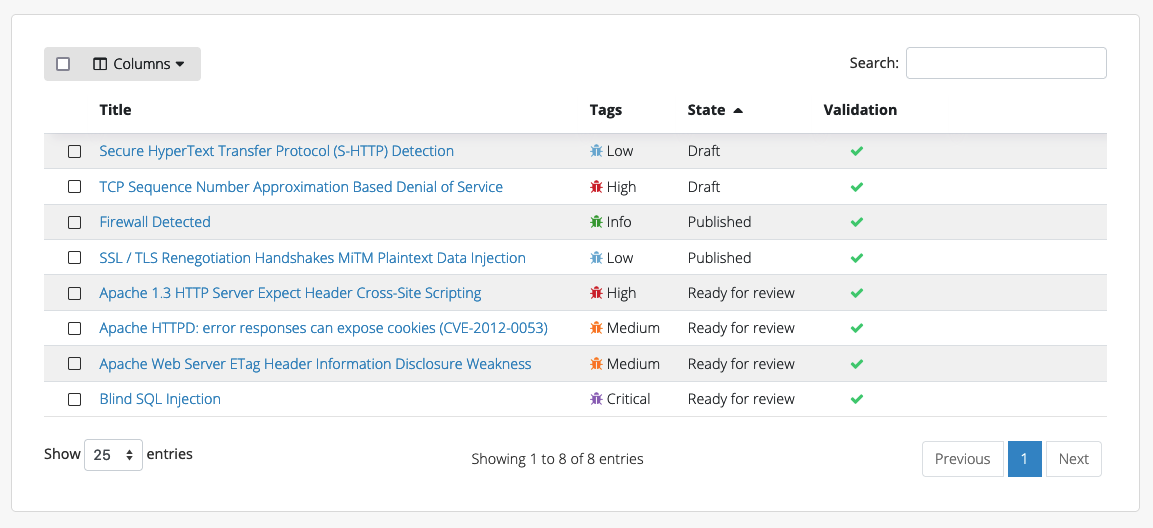
Review/approve Issues and Content Blocks before including them in reports.
The goal here was to give you a way to differentiate between “I’ve reviewed this issue” and “I haven’t reviewed this issue yet”.
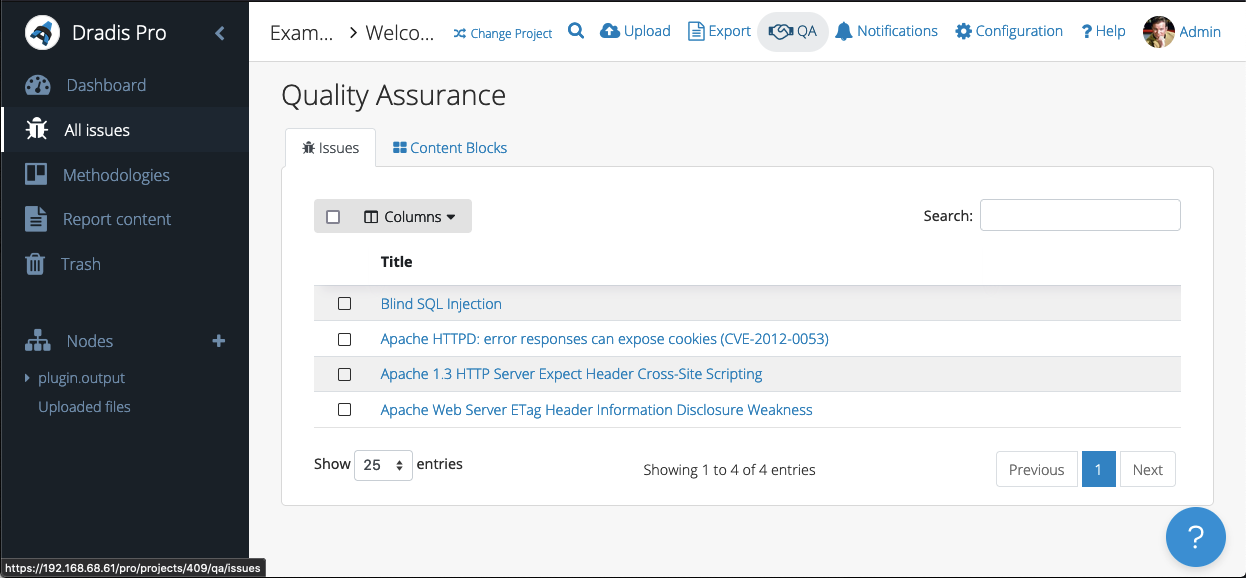
You can use the new QA view to look at your “Ready for review” Issues and Content Blocks and review them before including them in reports.
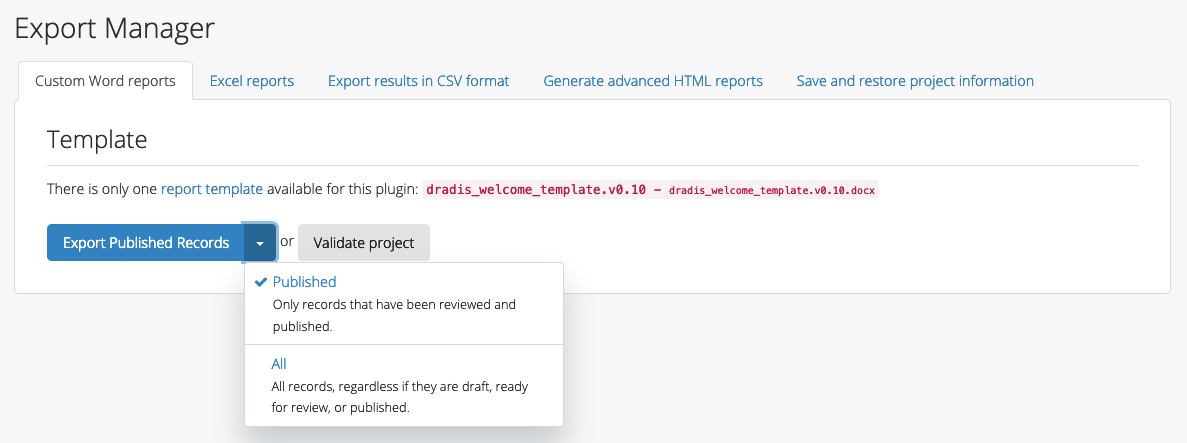
Then, on the Export page, the default is to export just the Published records. But, you can also export All if that makes more sense for your team’s workflow.
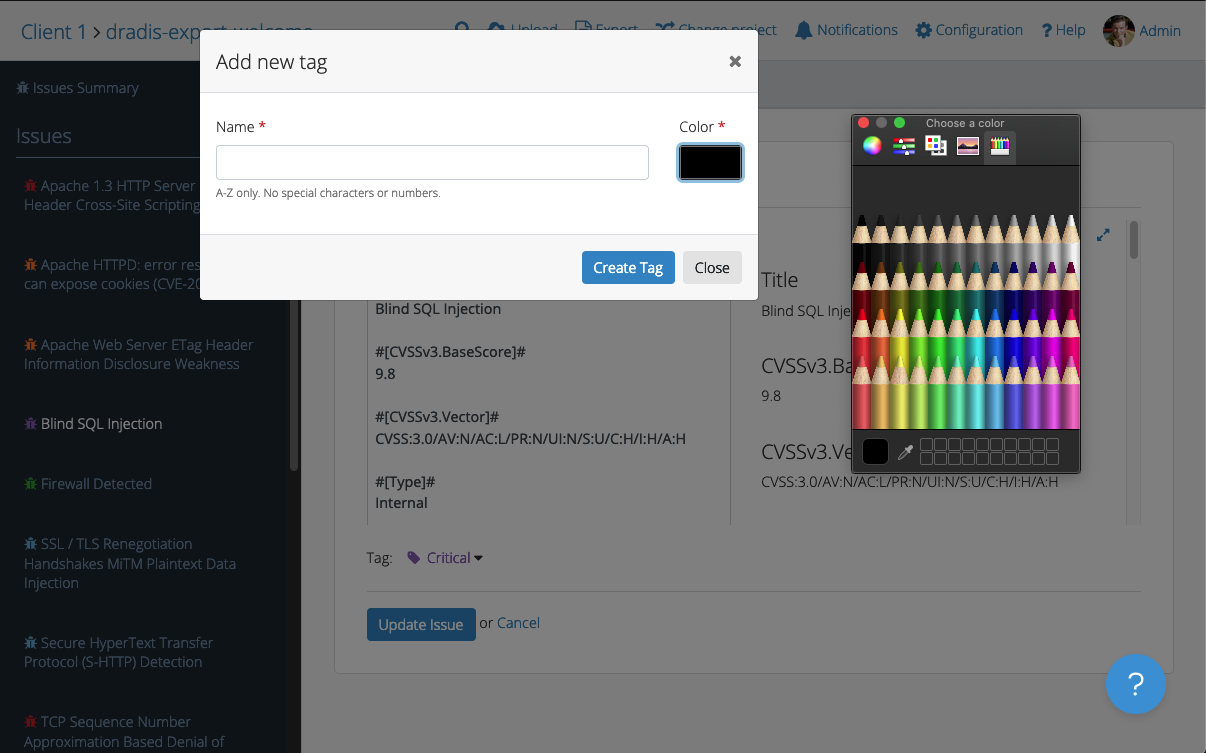
Previously, you could create custom tags by editing the XML of the project template directly. That’s still an option if you happen to enjoy dealing with XML. Otherwise, you can now use the UI for that whole process. There’s even a color picker so that you can get just the right shade for your custom tags.
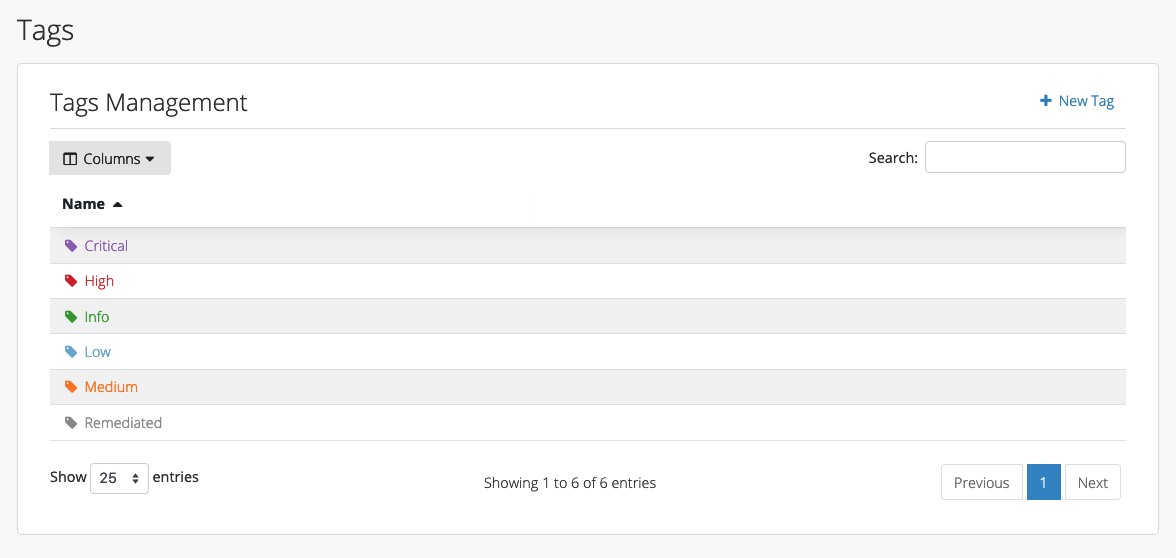
From the project level, you can also manage your tags and create, edit, or delete them as needed:
Improved admin and support features
Archiving projects – rather than moving them into the trash
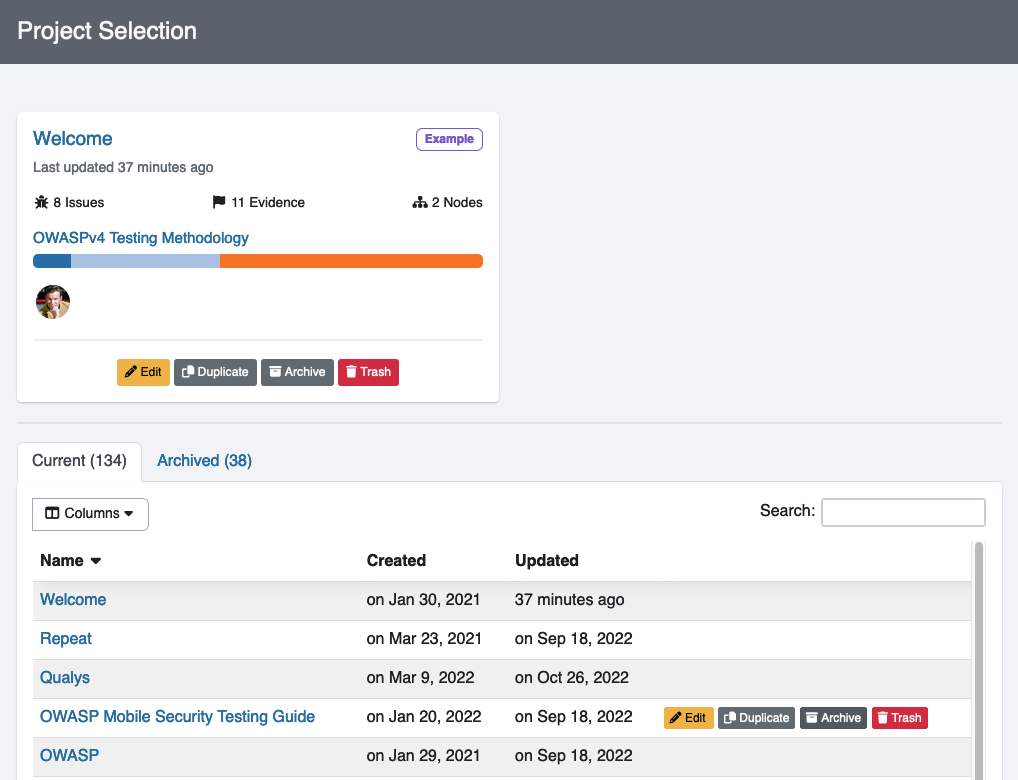
Previously, we had active projects or projects in the Trash and nothing in between. You asked for another way to organize projects and we delivered! Now, you can archive projects as well. Archiving a project does not delete a project, but leaves it in the Archive tab of the Projects view. This way you can maintain an uncluttered view of active projects without needing to send inactive projects to the trash.
Before v4.7, we had no way to receive usage data from your instance other than a ping to our licensing server when you first activate the instance. In v4.7, we have rolled out optional usage analytics that you can share with us. Yes, optional!
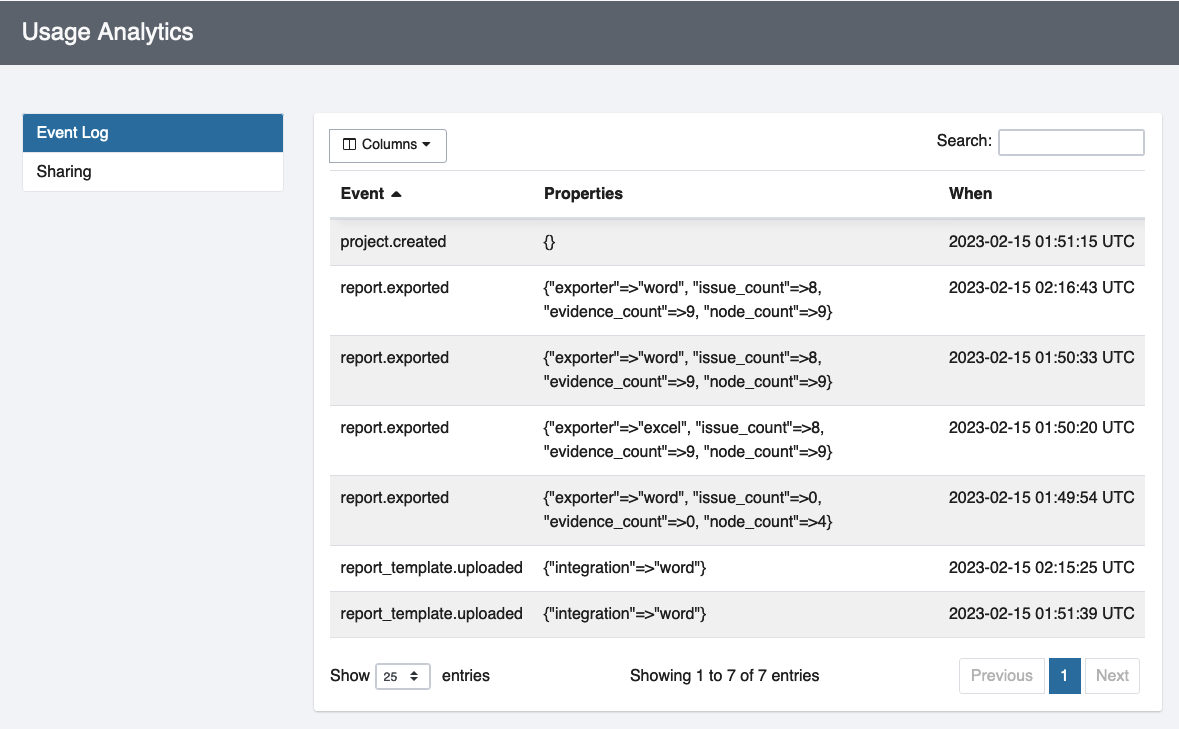
For full transparency, you can see exactly what you would be sending to us in the event log. It’s all anonymized data like “someone exported a Word report” or “someone logged in as a contributor” that is designed to help us understand how teams are using Dradis and should not reveal anything sensitive, not even your email address.
Of course, you can always opt out of sharing this data with us if you prefer. We’re excited to have a bit more information about how you’re currently using Dradis so that we can make the product even better for everyone in the future.
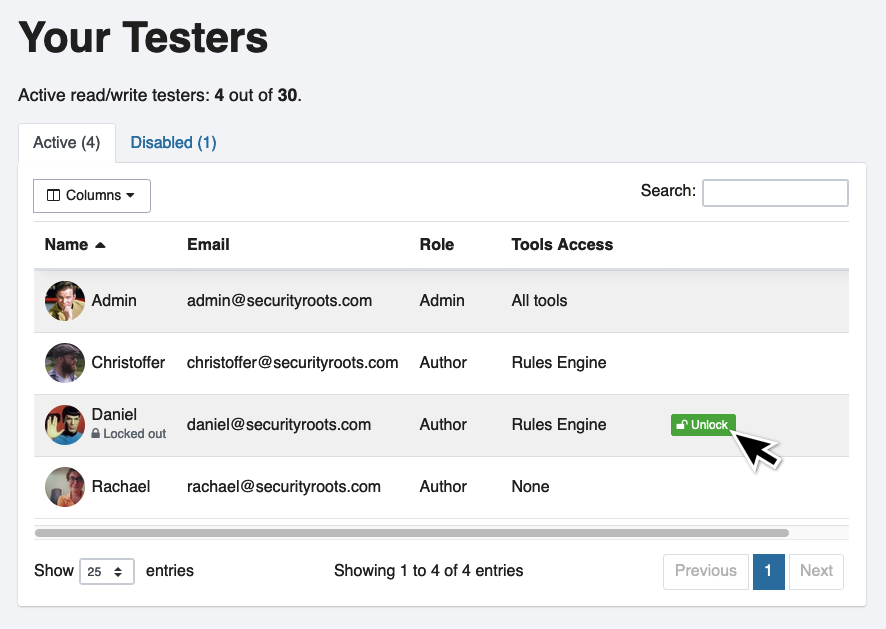
We’ve also added better in-app tester administration. If a user gets locked out of their account with too many incorrect login attempts, Admin users will now be able to unlock their account with 1 click.
v4.11 – the latest release
We’ve continued releasing updates in 2024, here’s an overview of our latest release:
Improved version history
Fixed liquid dynamic content preview in the editor
Fixed export crashing with links with trailing special character
Fixed link formatting for hyperlinks in inline code blocks
Dradis Framework is a collaboration and reporting tool for information security teams to manage and deliver the results of security assessments, in less time and with less frustration than manual methods.
Bug Fixes
Dradis v4.11.0 is full of bug fixes and technical updates. You may not see brand new features or changes to the UI but we fixed many, many different things behind the scenes. We also updated some behind-the-scenes aspects like the rails version.
Improved version history
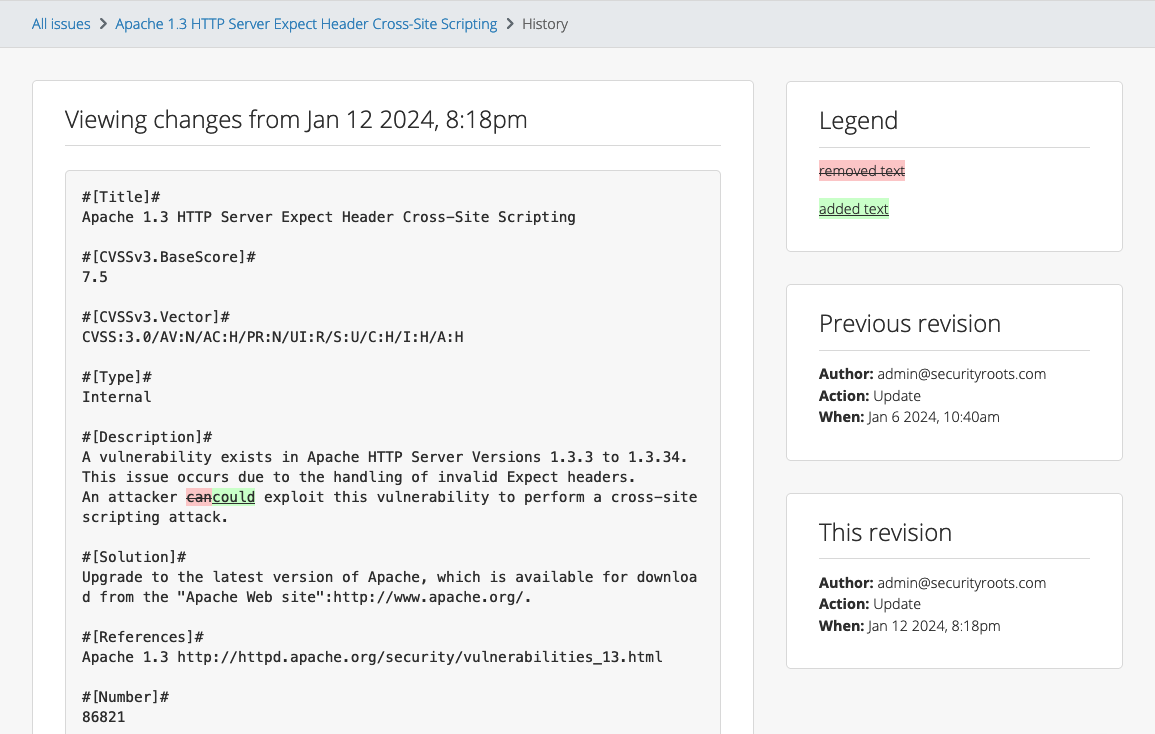
We’ve improved the version history and the way that it displays. Previously, the entire line/paragraph would be marked as changed, even if a single word was changed. Check out the new and improved version!
Fixed liquid dynamic content preview in the editor
Fixed export crashing with links with trailing special character
Previously, exports would crash if you included a link with a trailing special character. No more!
Fixed link formatting for hyperlinks in inline code blocks
We’ve also fixed the formatting of links inside code blocks so that they appear in the report exactly how you’d expect them to appear.
Release Notes
Assets: Add importmap-rails to handle js libraries
Liquid: Add LiquidAssignsService
nginx: Add HTTP/2 support
Revision history: Improve version history for content with carriage return
Tylium: Show liquid content in editor preview
Web-server: Replace unicorn with puma in production
Validation: Display attachment validator errors when viewing/editing a record
Flash alert: Allow the ‘license about to expire’ alert to be dismissed for the session
Upgraded gems:
rails, resque-scheduler
Bug fixes:
Code blocks: Remove extra padding and background for code elements outside of projects
Contributors: Expire one time token after login
Evidence: Prevent loading old Evidence template content at the Issue level
Methodologies: validate presence of content
Integration enhancements:
Authentication Integrations: Use the AuthenticationStrategies class for Rails 7 support
Burp: Fix compatibility with nokogiri >= 1.15
Nexpose:
Add port/protocol to evidences
Use the details in <os> as the OS node property
Import `vulnerability.risk_score` as a new Issue field
Allow multiple evidence with the same test id & node address
Qualys: Add support for the output for Qualys WAS API 3.13 and later
Reporting enhancements:
Word:
Fix export crashing with links with trailing special characters
Skip link formatting for hyperlinks in inline code blocks
Security Fixes:
Low: Authenticated (author) information disclosure
After a user has been removed from a project, they may still get notifications for Issues they were subscribed to, resulting in the disclosure of Issue titles.
Low: Information Disclosure in the Output Console of Upload Manager
Not using Dradis Pro?
Automated reports, generate the same reports your clients know and love in a fraction of the time.
Dradis Framework is a collaboration and reporting tool for information security teams to manage and deliver the results of security assessments, in less time and with less frustration than manual methods.
Validate your projects before your export
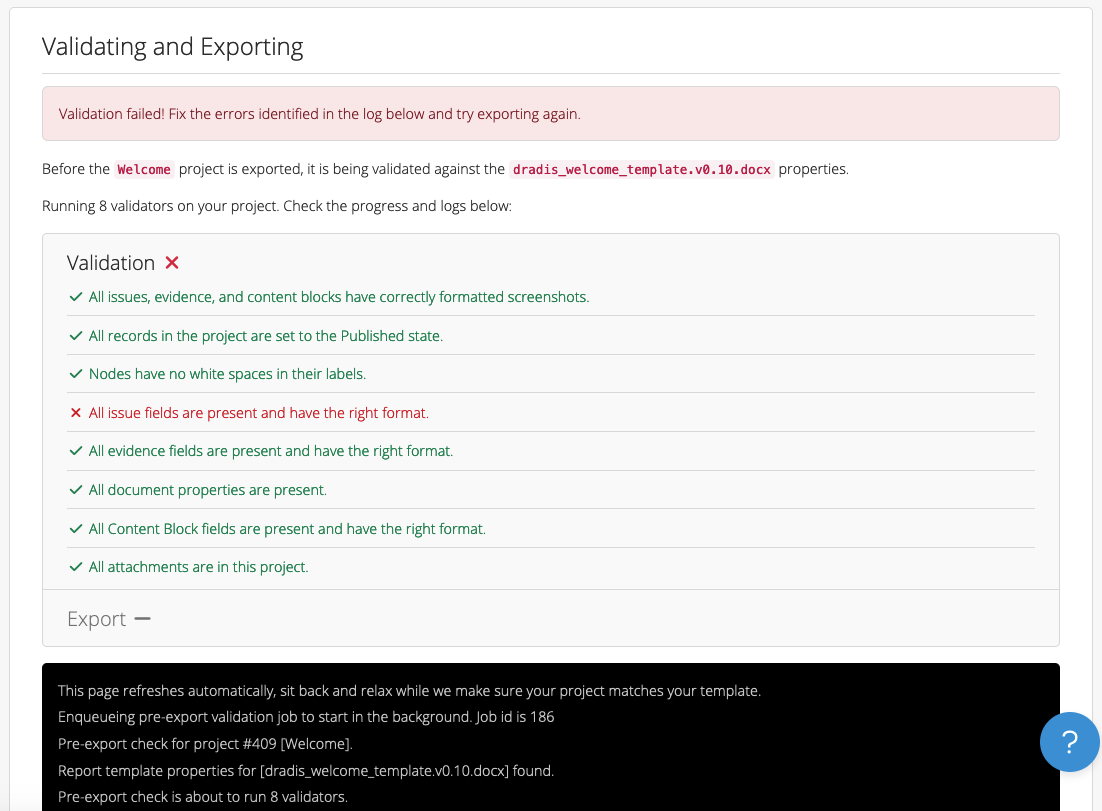
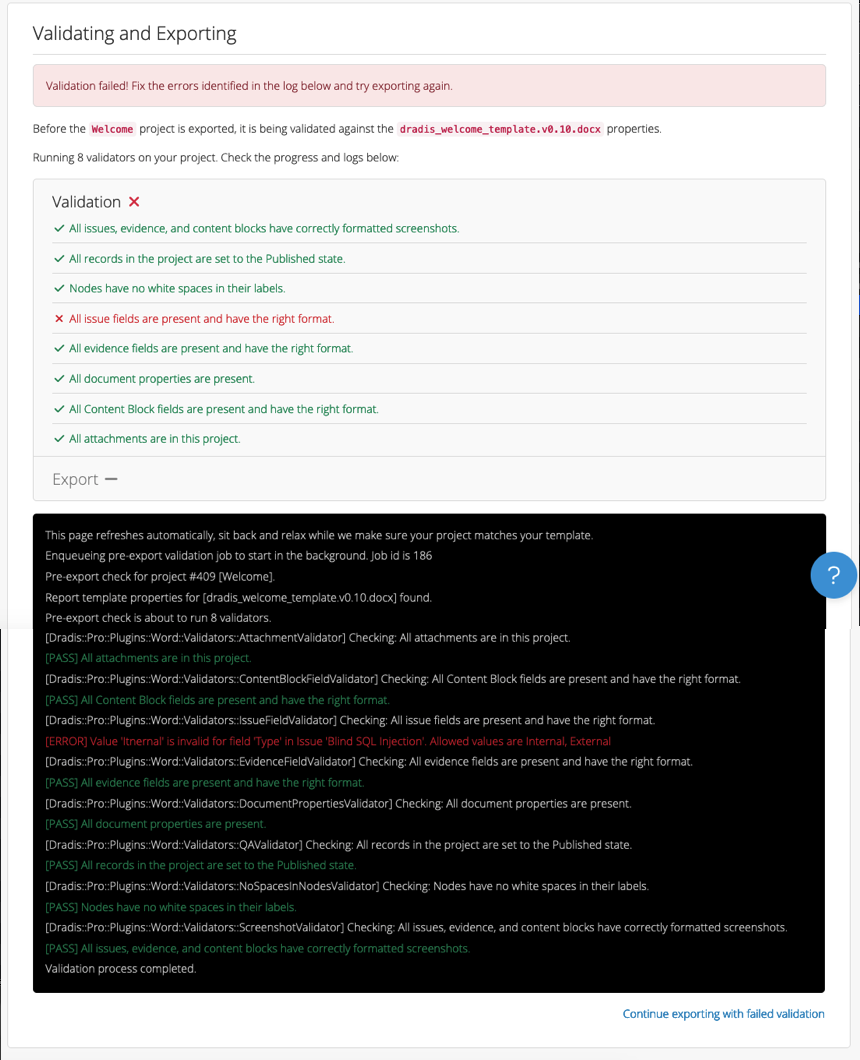
How many times have you gone to export a report and realized later that there was an error that the validator caught, you just didn’t validate first? Now, the validation is built into the exporter so that you’ll always get a heads-up about possible problems and can fix them before exporting the report. In the case of false positive validator warnings, you’ll have the option to bypass the errors and continue with the export.
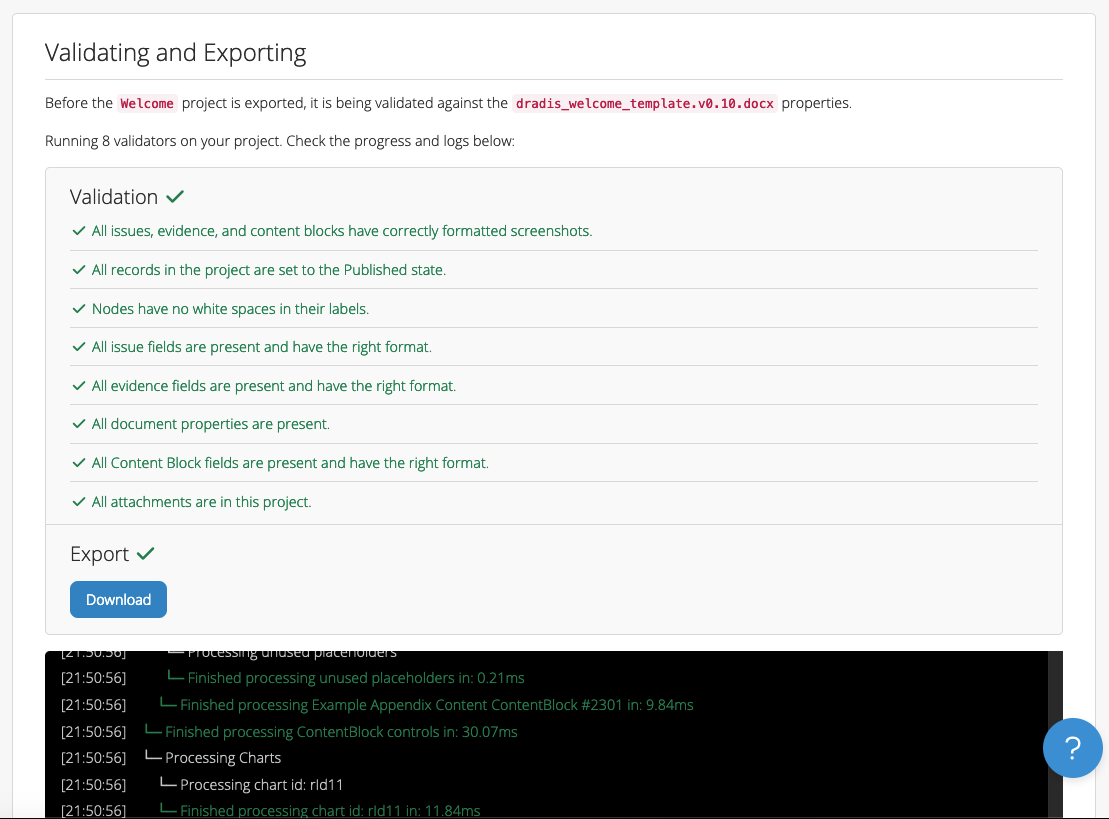
If there are no validation errors, the export will proceed with no extra clicks necessary!
Mappings Manager for Azure DevOps and Jira
What was previously the Plugin Manager is now the Mappings Manager as we’ve extended the functionality to Azure DevOps and Jira. You told us that you usually have a pattern for the data that you send to these external tools. For example, you’d want a specific set of fields from your Dradis issue to go into your Jira card’s description.
The Mappings Manager allows you to configure that mapping so that the next time you send an Issue to Azure DevOps or Jira, the editor will pre-populate with the data from your Issue in the exact format you specified. You’ll still have the ability to edit it before sending the Issue to Azure DevOps or Jira if needed.
Archiving projects
Previously, we had active projects or projects in the Trash and nothing in between. You asked for another way to organize projects and we delivered! Now, you can archive projects as well. Archiving a project does not delete a project, but leaves it in the Archive tab of the Projects view. This way you can maintain an uncluttered view of active projects without needing to send inactive projects to the trash.
New Methodologies REST API endpoint
You can now access Methodology data including Boards, Lists, and Cards via the REST API.
Release Notes
Report Template Properties: Add fields with “String” type by default
Tylium: Consolidate sidebars
Integration Manager:
Add error handling for enabling/disabling and installing incompatible files
Add the HTML Exporter to the Tools Manager
Plugin Manager: Add support for Liquid content in templates
Dradis Framework is a collaboration and reporting tool for information security teams to manage and deliver the results of security assessments, in less time and with less frustration than manual methods.
Liquid Dynamic Content in Word and HTML reports
We have already supported Liquid content in Dradis Gateway templates for a while – now we are bringing Liquid Dynamic Content to Word and HTML reports as well.
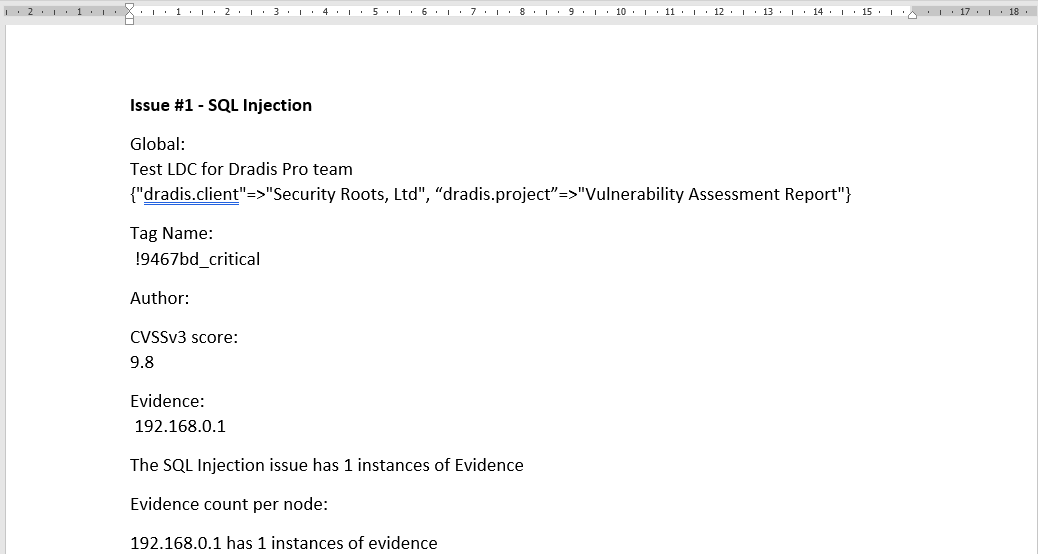
Want to refer to document properties like dradis.client inside a ContentBlock? Want to show the count of evidence inside the text of an Issue? Want to use conditionals like “If this property is in Spanish, export this issue in Spanish instead of English”? Now you can! For example, the following will export into an Issue:
#[Description]#
Global:
{{ project.name }} for {{ team.name }} team
{{document_properties.available_properties}}

Tag Name:
{% for tag in issue.tags %} {{ tag.name}} {%endfor%}

CVSSv3 score:
{{ issue.fields['CVSSv3.BaseScore'] }}

Evidence:
{% for evidence in issue.evidence %} {{ evidence.fields["Label"] }} {%endfor%}

The {{ issue.title }} issue has {{ issue.evidence.size }} instances of Evidence

Evidence count per node:
{% for node in issue.affected %}
{{ node.label}} has {{node.evidence.size}} instances of evidence
{% endfor %}
It would give a result like the following:
Better filters in Word templates
We now have two more filtering options available in Word: Filters with spaces, and filters on Nodes.
Filtering with spaces means you can use double quotes in both field names and filter values. For example, you can filter by "CVSS Base"|(9.0..10.0) or Category|"A1 Injection".
Nodes can be filtered by Node Properties. For example, if you have a Node property for type with values of internal/external, you can filter a Node by type|internal to only see content for internal-type Nodes.
DuoWeb and ServiceNow support in the Integration Manager
We have changed the way our integrations work, so you can now install DuoWeb and ServiceNow right in the Integration Manager. No need to use the command line to install 2FA! You can also configure Duo and ServiceNow, as well as integrations like Azure DevOps, right in the Integration Manager.
Release Notes
AccessTokens: allow the storage of per-user encrypted tokens
QA: Show state changes in activity feed
Sessions: Store :secret_key_base in encrypted configuration file
Tylium: Extend support for Liquid Dynamic Content
Upgraded gems:
bootstrap, popper_js, simple_form
Bugs fixes:
Issue Library: Prevent rendering navbar over top of the fullscreen editor
QA: Redirect to correct view when changing states on QA edit views
Users: Force logout for users with locked accounts
Integration enhancements:
Acunetix: Parse inline code, not just code blocks
Burp: Adds strong and code tags parsing
CSV: Fix CSV Upload for files with special characters
Nessus:
Parse code tags as inline code
Add plugin_type as an available Issue field
Nexpose:
Parse inline code, not just code blocks
Wrap ciphers in the ssl-weak-message-authentication-code-algorithms finding
Qualys: Adds Request/Response Evidence fields for Web Application Scans (WAS)
Azure DevOps: Switch authentication from PAT to OAuth2
Duo 2FA:
Migrate to UI-based configuration
Add to Integrations Manager
ServiceNow:
Migrate to UI-based configuration
Add to Integrations Manager
Reporting enhancements:
Word
Add support for filtering nodes by properties
Add support for the notextile tag
Allow multi-word fields/values in the content control filters with double quotes
Extend support for liquid dynamic content in Word reports
Warn of missing blank lines around a screenshot only when it’s not the first or last item in a field
Not using Dradis Pro?
Automated reports, generate the same reports your clients know and love in a fraction of the time.
I was fortunate enough to attend RailsConf Atlanta 2023, and in this post I share some of the thoughts that I gathered while reflecting upon the conference.
What is RailsConf?
RailsConf is a Ruby on Rails developer’s dream. It’s a place where some of the best Rails developers come together once a year to share knowledge and expertise, and meet like-minded individuals. You have the ability to attend workshops from Rails developers that have large YouTube followings, and attend talks that discuss in-depth technical topics. It was an action-packed 3 days, and the best part was how welcoming and diverse the Rails community is!
We’re a small organization, but we have a mighty team!
As the days went on, I began to reflect and compare my experience at Security Roots with what others were sharing about their own working lives. I met developers from all over the USA, Canada and Europe. As we were discussing the different ways that our companies operate, and I was sharing my experience about how we work at Security Roots, it was apparent that we’re doing something special here.
Working asynchronously is no easy feat, but our founder has figured out a formula for making this working model a success.
“How do you get work done if you don’t have meetings?” One developer asked me.
I laughed as this was a common question I was getting.
It was interesting to learn that we had just as many, if not more, releases than most other teams over the past 8 months.
“We have great documentation, and everybody takes ownership of their work. I said. “We find information ourselves, only asking others if we have looked extensively first. We get things done because we know that there isn’t anyone else who’s going to do it for us.”
I watched as they stared back at me with confusion, surprise, and undoubtedly one thousand questions running through their mind.
It was eye-opening to learn about other team structures, and what other developers’ day to day work lives look like.
Personal Growth
As a developer relatively early in my career, I am excited by the learning opportunities presented to me each day. Some of them include:
Learn the inner workings of virtual machines through debugging with users
Interact directly with users to determine what’s working and what’s not working for them, which informs my day-to-day work.
Work with a team of people from all over the world, everyone bringing a unique perspective to our work.
Take creative freedom in my solutions, and discuss them with my team.
Despite not having meetings, we are a very collaborative and close-knit team, and this is the greatest thing about working at Security Roots.
After coming back, I couldn’t wait to share what I gathered at the conference with my team. Most notably, that what we accomplish with a small team is remarkable. We produce and release more than many other larger teams, without sacrificing quality.
I felt inspired and excited to come back to my team and write beautiful Rails code!
I learned a lot at RailsConf, including:
How to contribute to the framework
How the inner workings of some of the most abstract parts of the framework function
How best to manage incoming Webhooks (from the master himself, Chris Oliver)
New command line tools that I can leverage every day
New ways of approaching problems.
It was great to be surrounded by so many Ruby on Rails developers who are just as passionate about their craft as I am.
I hope to take more members of the team with me next year!
Dradis Framework is a collaboration and reporting tool for information security teams to manage and deliver the results of security assessments, in less time and with less frustration than manual methods.
Quality Assurance
Review/approve Issues and Content Blocks before including them in reports.
The goal here was to give you a way to differentiate between “I’ve reviewed this issue” and “I haven’t reviewed this issue yet”.
You can use the new QA view to look at your “Ready for review” Issues and Content Blocks and review them before including them in reports.
Then, on the Export page, the default is to export just the Published records. But, you can also export All if that makes more sense for your team’s workflow.
Tester Administration
We’ve also added better in-app tester administration. If a user gets locked out of their account with too many incorrect login attempts, Admin users will now be able to unlock their account with 1 click.
Release Notes
Quality Assurance: Review/approve Issues and Content Blocks before including them in reports
Tester Administration: Add unlock button to UI for locked Testers
Integration enhancements:
JIRA: Add support for Jira Data Center v8.4+
Upgraded gems:
rack, rails, time
Bug fixes:
Kits: Enable import of kit with no project template
Dradis Framework is a collaboration and reporting tool for information security teams to manage and deliver the results of security assessments, in less time and with less frustration than manual methods.
Inline Code Support
We already supported code blocks, but now, you can use @ symbols to create in-line code inside of your Dradis project:
When you export this to a Word report that has a custom InlineCode character style, you’ll get that code styled automatically:
Custom Tag Management
Previously, you could create custom tags by editing the XML of the project template directly. That’s still an option if you happen to enjoy dealing with XML. Otherwise, you can now use the UI for that whole process. There’s even a color picker so that you can get just the right shade for your custom tags.
From the project level, you can also manage your tags and create, edit, or delete them as needed:
Opt-in Usage Analytics
Prior to v4.7, we had no way to receive usage data from your instance other than a ping to our licensing server when you first activate the instance. In v4.7, we have rolled out optional usage analytics that you can share with us. Yes, optional!
For full transparency, you can see exactly what you would be sending to us in the event log. It’s all anonymized data like “someone exported a Word report” or “someone logged in as a contributor” that is designed to help us understand how teams are using Dradis and should not reveal anything sensitive, not even your email address.
Of course, you can always opt out of sharing this data with us if you prefer. We’re excited to have a bit more information about how you’re currently using Dradis so that we can make the product even better for everyone in the future.
Release Notes
Configurations: Add usage tracking and sharing
Content Blocks:
Add auto-caching
Add image upload button to source view toolbar
Issues: Display the results from importers in a Datatable
Rubocop CI:
disable EnforcedShorthandSyntax rule under Style/HashSyntax cop
Tylium:
Add breadcrumbs to Revision History view
Add secondary sidebar toggling functionality
Remove Recent Activity tabs and add View History link to the dots menu
Tags: Add tag management
Nginx:
Remove support for TLSv1.0 and TLSv1.1
Add support for TLSv1.3
Integration enhancements:
Burp: Add support for large base64 response
Nessus: Clean up code tags in description fields
Netsparker: Add issue.classification_owasp2021 as a new avaiable field
Dradis Framework is a collaboration and reporting tool for information security teams to manage and deliver the results of security assessments, in less time and with less frustration than manual methods.
Integration and Tool Manager
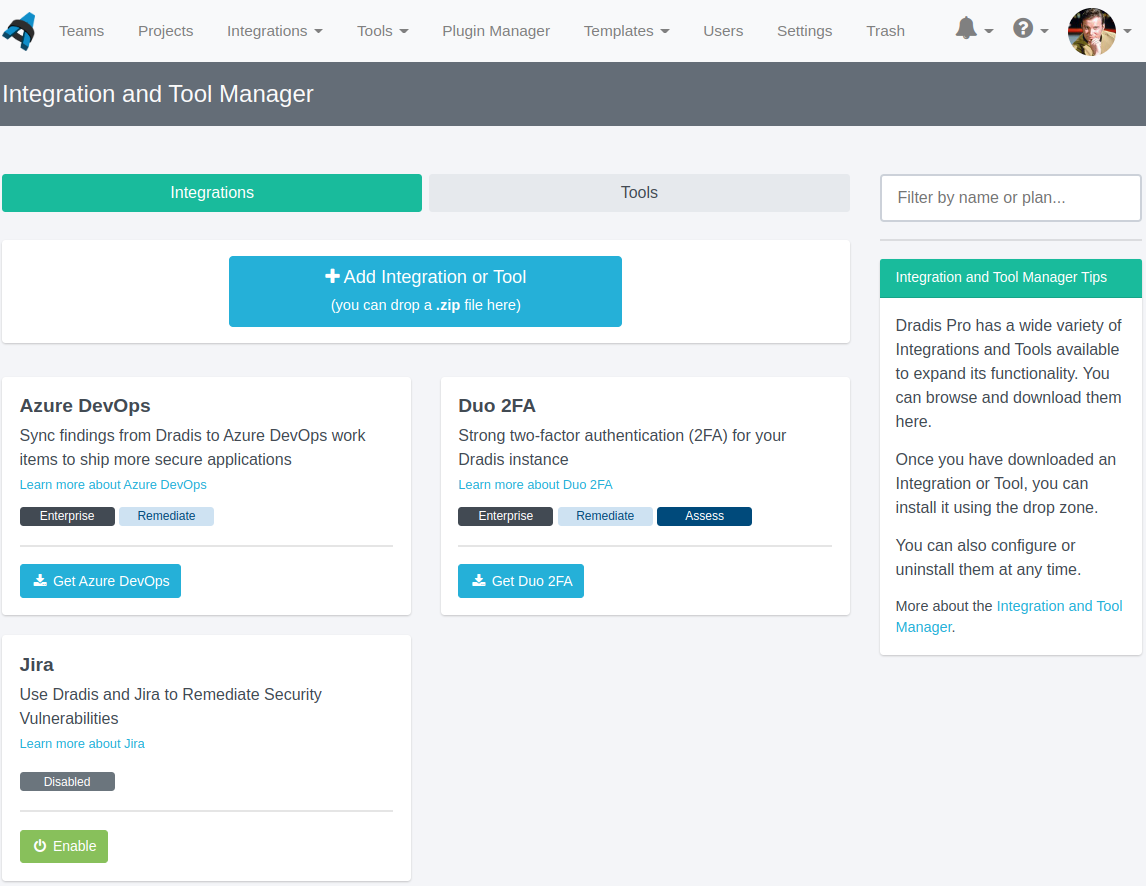
Now you can install and upgrade integrations (such as DuoWeb and Jira) and tools (such as the Gateway and the Remediation Tracker) directly in the Dradis application – no need to use ssh or the command line! Simply browse to the Integration and Tool Manager in Dradis v4.6, Get the tool, and then Enable it. Then you should be good to go!
Instance Dashboard
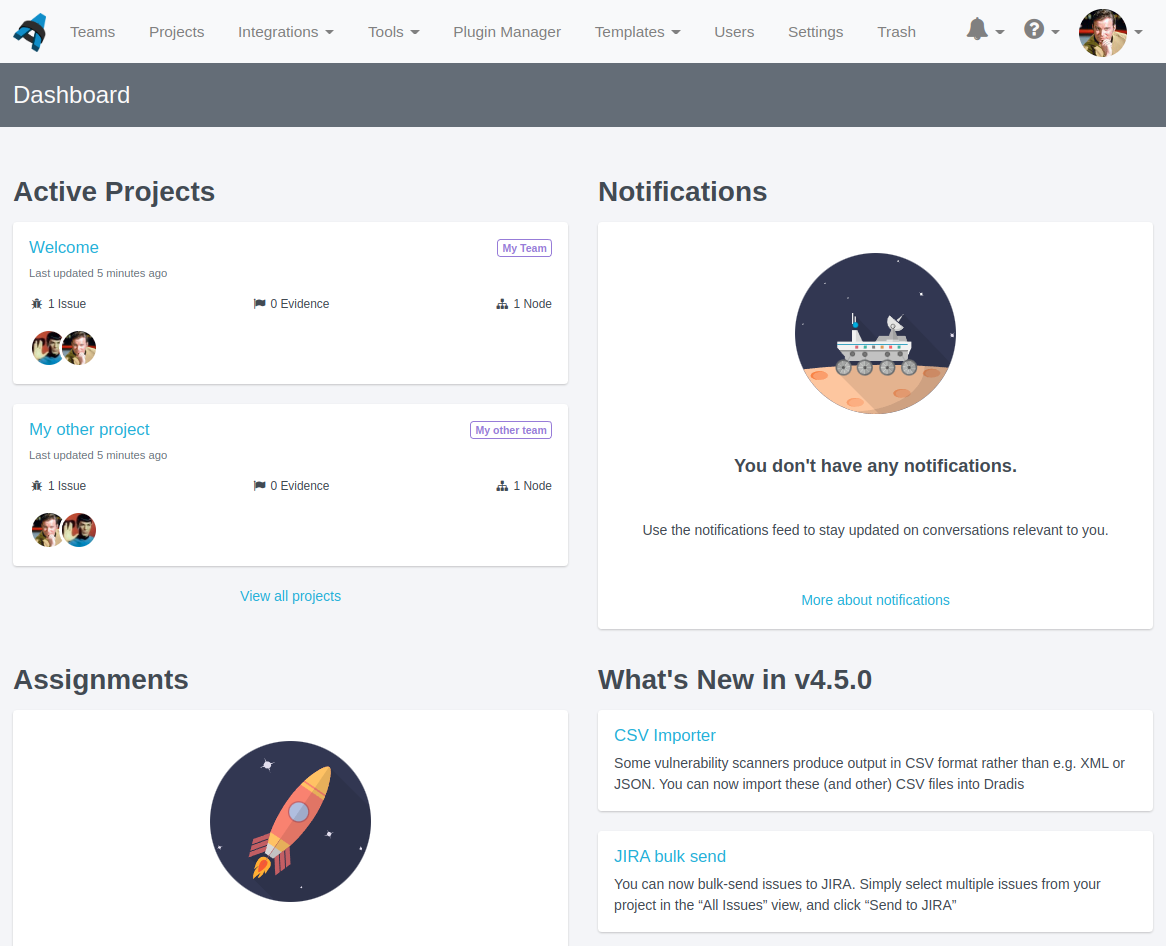
Want a better overview of what is going on in your Dradis instance after login? The new Instance Dashboard gives you an at-a-glance overview of Projects, Tickets, and Tasks assigned to you; a list of the newest unread notifications; and and overview of what’s new in the latest version of Dradis.
As a new feature, please do let us know if there are other things you would like to see or change on the instance dashboard once you start using it.
Permanently delete items in Trash
As of v4.2 of Dradis, you could soft-delete projects and teams so they end up in an Instance Trash. However, to permanently delete items in trash, you needed to use the command line. Not anymore! Now you can permanently delete items in Trash straight from the UI.
New Kits
We have long had a few templates and kits available for download at the Dradis Users Portal. We have overhauled some of these kits and made them available directly from the Dradis UI. Simply go to Templates –> Kit Upload, and either upload a kit file as you normally would, or click the Upload button under your preferred preinstalled testing kit.
Release Notes
Dashboard: See active projects, notifications, assignments, and what’s new in one view
Integration and Tool Manager: Add UI for installing and managing integrations
Kits:
Add selection of kits to choose from
Enable import of kit with no templates
Mintcreek: Adjust element contrast ratios to be WCAG 2.1 compliant
Navbar:
Split the Addons menu into Integrations and Tools menus
Remove inaccessible addon’s menu items for contributors
Notes: Remove category selection from form UI
Projects: Update active projects empty state
Trash: Delete projects and teams permanently
Rubocop: lint changed files since previous commit
Upgraded gems:
nokogiri
Bugs fixes:
Comments: Align comment header content in Safari
Content Blocks: Fix revision history links
New integrations:
Core Impact
Veracode
Integration enhancements:
Implement enable/disable feature for Gateway, JIRA, Remediation Tracker, Scheduler, and VSTS
JIRA:
Add view for editing configuration
Hide link in addons menu for contributors
VSTS:
Add view for editing configuration
Issues: add WorkItem Status and Comment feed
REST/JSON API: new v2 released
Projects: undiscard and permanently delete from trash.
Teams:
Undiscard and permanently delete from trash.
Deprecate the “/clients” endpoint, use “/teams”
Deprecate the “client_since” attribute, use “team_since”
Not using Dradis Pro?
Automated reports, generate the same reports your clients know and love in a fraction of the time.
Dradis Framework is a collaboration and reporting tool for information security teams to manage and deliver the results of security assessments, in less time and with less frustration than manual methods.
CSV Importer
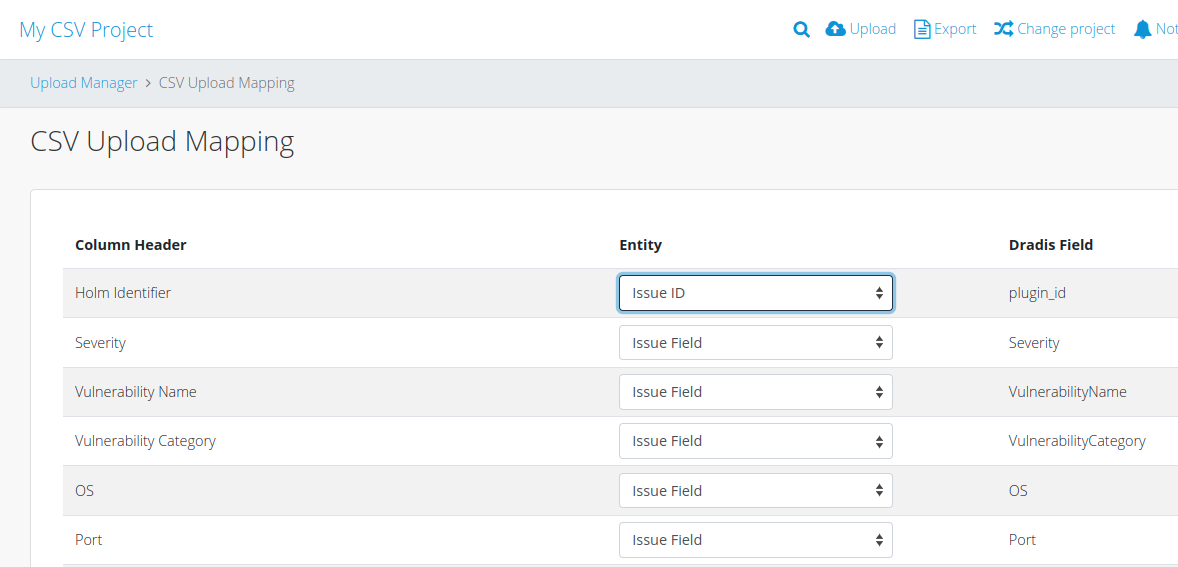
Dradis can now import CSV files into projects! Some vulnerability scanners produce output in CSV format rather than e.g. XML or JSON. You can now import these (and other) CSV files into Dradis, and configure which column to assign to which field in your Dradis projects on a per-file basis. Simply go to “Upload”, select the CSV importer, upload a file, and you will be redirected to an interface to assign data to fields. As with other plugins, you can create Issue, Evidence, or Node data and fields.
This is v1 of the CSV importer, so we look forward to your feedback on what works for you and what you would like to see in the future from this feature!
Note that for the sake of internal naming consistency, we have renamed the CSV exporter plugin with this change, so if you have the CSV exporter installed, you will need to reinstall the plugin as dradis-csv_export.
JIRA bulk send
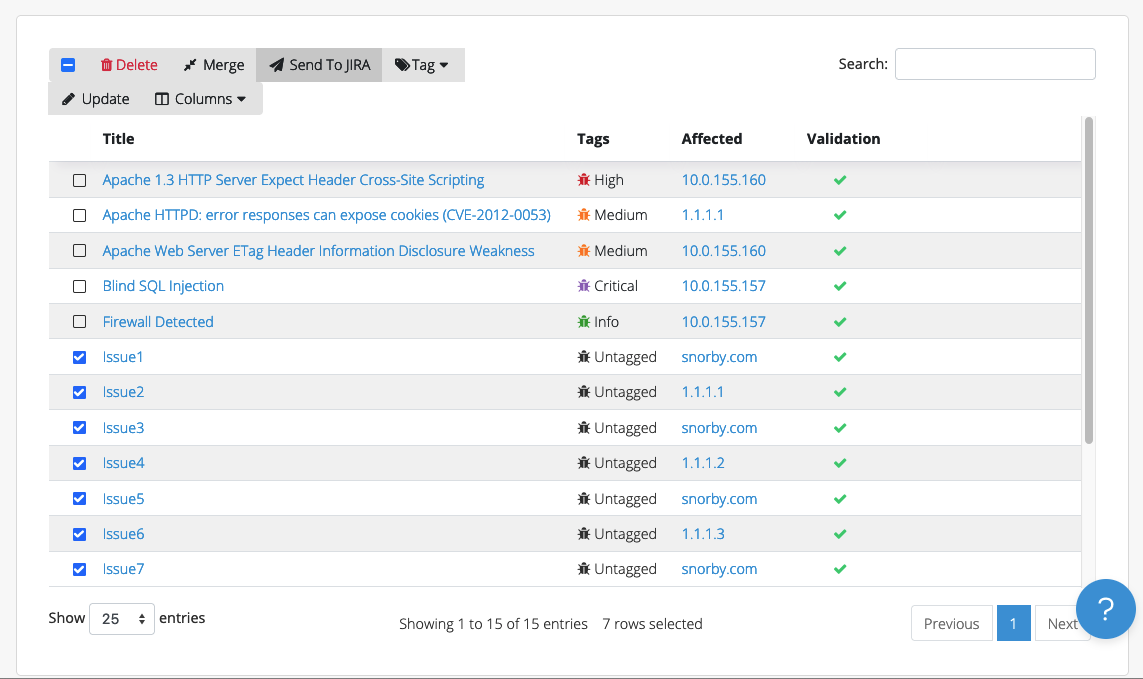
Do you use our JIRA integration? If so, you can now bulk-send issues to JIRA. Simply select multiple issues from your project in the “All Issues” view, and click “Send to JIRA”:
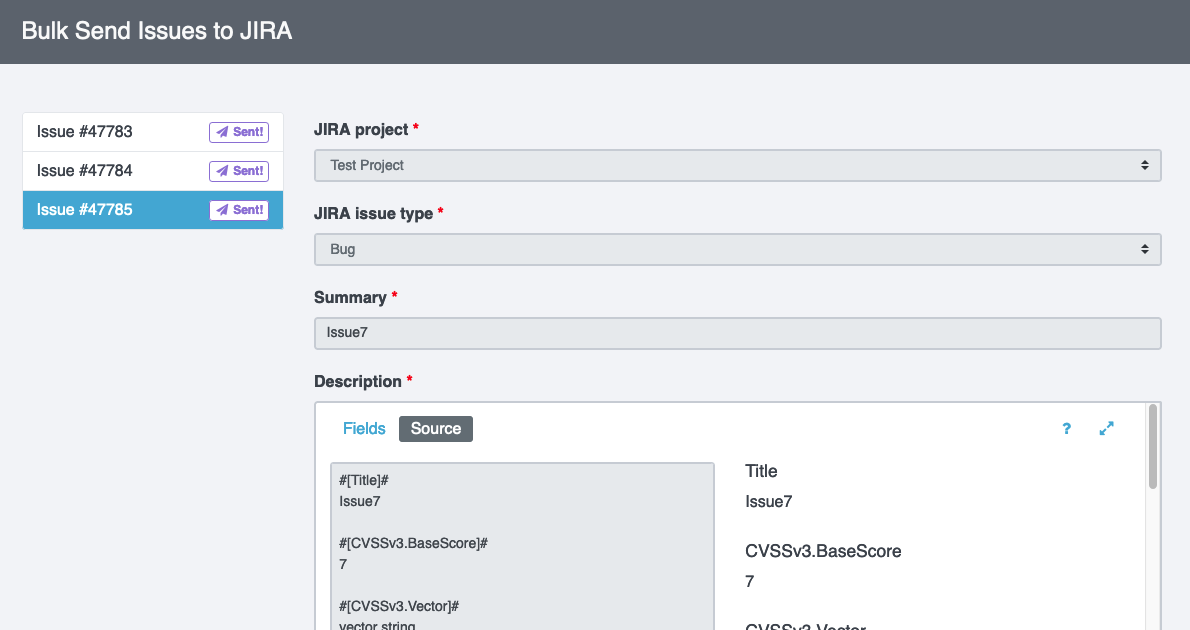
That will send all your selected issues to the Dradis-JIRA interface. Pick the destination project, issue type, and other required fields for each item, and you’re done!
Bug fixes and quality-of-life improvements
Another focus of the v4.5 release is working through some bug reports and lower-level requests we have accumulated over time.
Bug fixes include multiple items relating to attachment validation and export, Node labels linking to external resources (so e.g. clicking on a Node label of “www.google.com” will no longer redirect you to Google instead of the Node in Dradis), and the Rules Engine matching against IssueLibrary entries without trailing empty lines.
Quality-of-life improvements include adding Revision History for Content Blocks and improved error messages in the Output Console on Word report export. Check our release notes for more detail!